spin0 portfolio
Forecast Grid
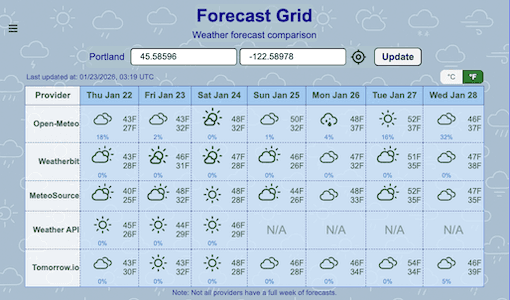
A matrix that places forecasts from different providers for quick comparison
App features
- Unified forecast grid combining multiple weather providers.
- Clear views with consistent formatting.
- Normalized weather descriptions and icons across providers.
- Responsive layout that adapts cleanly across screen sizes.
- User guide is available inside the app via the menu.
Tech Stack
- Frontend: Next.js, React, TypeScript
- Weather forecast providers: Open-Meteo,Weatherbit, MeteoSource,WeatherAPI, Tomorrow.io
- Weather icons: Iconify
- Location lookup: Geoapify
- Storage: LocalStorage
- Deployment: Vercel
Motivation
- Different apps kept giving different forecasts — not knowing which one to trust, sometimes I got soaked, sometimes I over‑prepared.
- I wanted to understand why forecasts differ so much.
Early exploration
- I installed several different apps, but switching apps was inconvenient and comparing them was impossible.
- Found that the apps rely on different APIs, each built on its own data sources, models, and processing techniques.
Prototyping
- Started with a Python script printing raw forecast values.
- It helped me understand how each provider structures data.
Development process
- Chose Next.js for routing and fast SSR, React for the UI foundation, and Iconify for consistent weather icons.
- Designed a compact grid to show forecasts from multiple providers all at once.
- Created a unified set of weather descriptions and normalized forecast information across providers with very different response formats.
Challenges
- Providers used different timezones and started their daily forecasts at different timestamps, so it was necessary to create a set of canonical dates and map everything into common days and hours.
- Handling events passed through redirects with mixed server and client components required careful debugging.
- Precipitation data varies widely — some providers return probability percentages, others return amounts in mm or inches with unclear labels, so some cases still need closer investigation.
What I learned
- Developing strategies for interpreting inconsistent API structures and aligning data from multiple sources.
- Designing UI patterns that remain clear and stable across very different screen sizes.
- Gaining a better understanding of how server and client components interact in real workflows.
Future enhancements
- Looking for more providers that offer full‑week forecasts on free‑tier APIs.
- Exploring the possibility of adding hourly forecasts, if free APIs allow.
- Considering a feature that sorts providers by reliability determined by each user.